To download the Operating System tOSh, you can do it from the Resources section of this same site.
Parts
This series of articles will have the following parts:
- Part I - Bootloader
- Part II - Stage 1
- Part III - Jumping to C
- Part IV - Interrupts <— You’re here
- Part V - Filesystem and Floppy Drive Driver
- Part VI - Booting on different types of machines
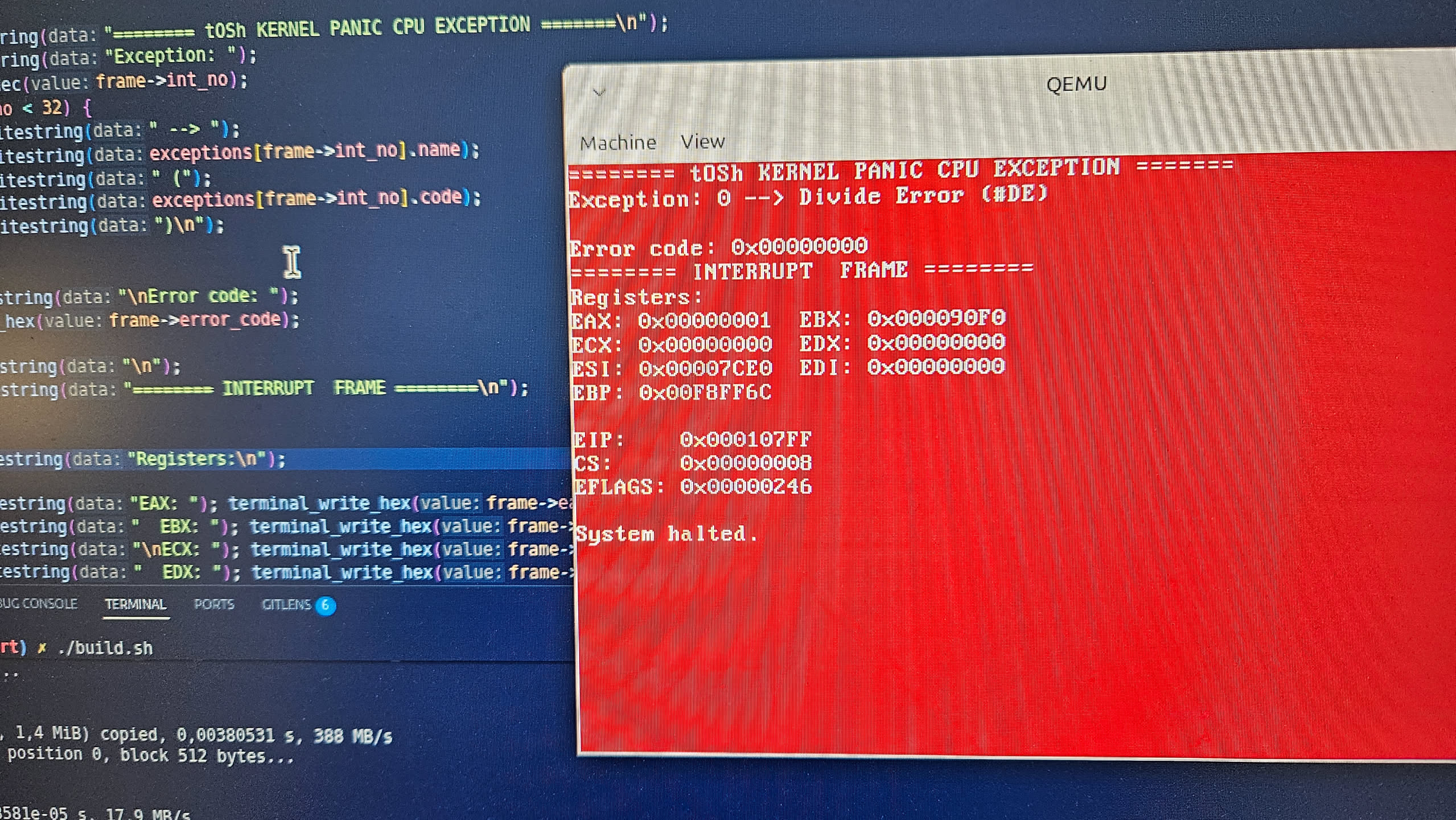 tOSh Kernel Panic!
Interrupts
The fact that both old-school and modern PC architectures are based on [Interrupts] is precisely because of this chip, Intel’s Chip 8259a PIC.
An interrupt is a signal received by the CPU that temporarily stops whatever the CPU is computing so it can handle (or manage) an event with a higher priority.
For a PC to interact with any sufficiently complex electronic device, there has to be some kind of interaction with a CPU, to a greater or lesser extent. One option was to simply go around asking each device "Hey!, what’s up?".
However, constantly asking connected devices whether they need anything wastes time and resources on every single question. This strategy is called (Polling).
One of the solutions proposed to avoid Polling is simply to let the CPU do its thing and run its programs normally, and wait for a signal when it’s time to attend to some action from someone. The two most common types of CPU interrupts are, for example:
-
Hardware Interrupts: They are sent asynchronously by physical devices such as mice, keyboards, and hard drives, which need attention from time to time. For example, pressing a key on a PC keyboard triggers a hardware interrupt and INTERRUPTS EVERYTHING, and you have to let whatever it is executing, whether it’s a Kernel or a program in "Userspace", stop and handle the interrupt immediately.
-
Software Interrupts: Exceptions or Traps, generated internally by the processor or by a running program due to an error (such as dividing by zero) or by a request to the operating system via a system call.
How Do You Handle an Interrupt?
Diego Silicio reminds us in his "interrupted sextillas":
Original:
acá le venimo' a canta'
en compás he interrumpido
usted, amigo tupido
pero nunca 'ES' como humano
PICante es el paisano
en su línea se ha unido
Translation:
here we come to sing to you
in interrupted meter
you, my dense friend
but never 'IS' like a human
PICante is the countryman
on his line he has joined
Explanation: The poem is packed with technical and linguistic wordplay. “PICante” combines PIC (Programmable Interrupt Controller) with picante (“spicy”), while “paisano” keeps the gaucho/countryman voice of the poem.
There is also a layered joke in “usted, amigo tupido / pero nunca ‘ES’ como humano”. Tupido can mean dense/thick, but tupido + ES visually produces “EStupido”, evoking estúpido (“stupid”). At the same time, ES is literally the Spanish verb es (“is”), so “nunca ES como humano” means “it is never like a human.” The capitalization makes the hidden EStupido construction more apparent.
So the poem simultaneously talks about interrupts and PICs while disguising technical terminology inside deliberately gaucho-style verse and wordplay.
The cryptic gaucho has interrupted us, but once we finish this exasperating article, his song will be attended to by everyone.
When an interrupt occurs, the CPU should save the execution context somewhere. The stack is a good place.
So: Save context -> Execute an Interrupt Service Routine ISR (we’re getting to this very soon) -> Restore the context and keep working.
Before I can even start putting together the interrupt routines, which we’re only going to handle a couple of for now, I still have to explain even more things, because in the world of the PC, nothing is, unfortunately, simple.
The PIC - Programmable Interrupt Controller
In a traditional PC, the Programmable Interrupt Controller or Chip 8259a PIC is the intermediary between devices and the processor.
Devices don’t talk directly to the processor.
They are connected to the PIC through interrupt lines called Interrupt Request or IRQs.
The PIC receives those signals and takes care of telling the CPU that someone is asking for attention.
If we read the Chip 8259a PIC datasheet for a bit, we’ll find that it has 8 IRQ lines, from IRQ0 to IRQ7, and everything is just fine until we have 9 or more devices to connect simultaneously, because we run out of them.
At some point in the ’80s they effectively ran out of IRQs for devices, and like good engineers, they slapped another one in there, creating a master/slave setup with two Chip 8259a PICs connected in cascade.
| Hardware Line | 8259a PIC Chip | Default Vector | Protected Mode Remapped | Assigned Device | I/O Port Used |
|---|---|---|---|---|---|
| IRQ 0 | Master | 0x08 |
0x20 |
Programmable Interrupt Timer (PIT) |
0x20 (Command), 0x21 (Data) |
| IRQ 1 | Master | 0x09 |
0x21 |
PS/2 Keyboard |
0x20 (Command), 0x21 (Data) |
| IRQ 2 | Master | 0x0A |
0x22 |
Cascade Line (Connects Slave PIC) |
0x20 (Command), 0x21 (Data) |
| IRQ 3 | Master | 0x0B |
0x23 |
COM2 / COM4 Serial Ports |
0x20 (Command), 0x21 (Data) |
| IRQ 4 | Master | 0x0C |
0x24 |
COM1 / COM3 Serial Ports |
0x20 (Command), 0x21 (Data) |
| IRQ 5 | Master | 0x0D |
0x25 |
LPT2 Parallel Port / Sound Card |
0x20 (Command), 0x21 (Data) |
| IRQ 6 | Master | 0x0E |
0x26 |
Floppy Disk Controller |
0x20 (Command), 0x21 (Data) |
| IRQ 7 | Master | 0x0F |
0x27 |
LPT1 Parallel Port (Spurious IRQ Line) |
0x20 (Command), 0x21 (Data) |
| IRQ 8 | Slave | 0x70 |
0x28 |
CMOS Real-Time Clock (RTC) |
0xA0 (Command), 0xA1 (Data) |
| IRQ 9 | Slave | 0x71 |
0x29 |
ACPI / PCI Peripheral Extended |
0xA0 (Command), 0xA1 (Data) |
| IRQ 10 | Slave | 0x72 |
0x2A |
Open PCI Peripheral Slot |
0xA0 (Command), 0xA1 (Data) |
| IRQ 11 | Slave | 0x73 |
0x2B |
Open PCI Peripheral Slot |
0xA0 (Command), 0xA1 (Data) |
| IRQ 12 | Slave | 0x74 |
0x2C |
PS/2 Mouse Port |
0xA0 (Command), 0xA1 (Data) |
| IRQ 13 | Slave | 0x75 |
0x2D |
Floating Point Unit / Coprocessor |
0xA0 (Command), 0xA1 (Data) |
| IRQ 14 | Slave | 0x76 |
0x2E |
Primary ATA / IDE Hard Drive |
0xA0 (Command), 0xA1 (Data) |
| IRQ 15 | Slave | 0x77 |
0x2F |
Secondary ATA / IDE Hard Drive (Spurious) |
0xA0 (Command), 0xA1 (Data) |
By using IRQ2 as the Cascade Line, we lose one IRQ, but devices attached to the slave can access the CPU through it.
Device -> Slave -> Master -> CPU
Device -> Master -> CPU
Additionally, the Chip 8259a PIC allows interrupts to be masked. If we’re handling the keyboard and don’t want the floppy drive sneaking in at that moment, we tell the PIC "this particular IRQ" don’t bother with it.
This is what I do when configuring the IRQs: tOSh only implements 3 of them:
- IRQ0 (timer / pit)
- IRQ1 (keyboard)
- IRQ6 (floppy)
All interrupts are masked except these three, which I specifically unmask so they can be handled:
// idt.c

[...]

void interrupt_handler(uint32_t number)
{
    uint32_t irq = number - 32;
    switch (irq) {

        case 0:
            // timer (IRQ 0)
            pit_irq_handler();
            break;

        case 1:
            // Keyboard (IRQ 1)
            kbd_handler();
            break;

        case 6:
            // Floppy (IRQ 6)
            floppy_irq_handler();
            break;

        default:
            break;
    }

    pic_eoi(irq);
}
The IDT - Interrupt Descriptor Table
The IDT is a binary data structure specific to the IA-32 and x86-64 architectures and is the counterpart to the [Real Mode] and Long Mode IVT.
Configuring the IDT allows us to tell the CPU where our ISRs, or Interrupt Service Routines, are located. These are the functions we have to write ourselves in order to handle interrupts triggered by the processor or by devices. It is quite similar to the structure of the GDT.
Below is Intel’s Protected Mode Interrupt Table:
| Int. Nº (hex) | Int. Nº (dec) | Mnem. | Type | Err. code | Name | Source |
|---|---|---|---|---|---|---|
| 0x00 | 0 | #DE | Fault | No | Divide Error | DIV and IDIV instructions. |
| 0x01 | 1 | #DB | Trap | No | Debug Exception | Instruction, data, and I/O breakpoints; single-step; and others. |
| 0x02 | 2 | NMI | Interrupt | No | NMI Interrupt | Nonmaskable external interrupt. |
| 0x03 | 3 | #BP | Trap | No | Breakpoint | INT3 instruction. |
| 0x04 | 4 | #OF | Trap | No | Overflow | INTO instruction. |
| 0x05 | 5 | #BR | Fault | No | BOUND Range Exceeded | BOUND instruction. |
| 0x06 | 6 | #UD | Fault | No | Invalid Opcode (Undefined Opcode) | UD instruction or reserved opcode. |
| 0x07 | 7 | #NM | Fault | No | Device Not Available (No Math Coprocessor) | Floating-point or WAIT/FWAIT instruction. |
| 0x08 | 8 | #DF | Abort | Yes (zero) | Double Fault | Any instruction that can generate an exception, an NMI (Non-maskable interrupt), or an INTR (external interrupt). |
| 0x09 | 9 | — | Fault | No | Coprocessor Segment Overrun (reserved) | Floating-point instruction. |
| 0x0A | 10 | #TS | Fault | Yes | Invalid TSS | Task switch or TSS access. |
| 0x0B | 11 | #NP | Fault | Yes | Segment Not Present | Loading segment registers or accessing system segments. |
| 0x0C | 12 | #SS | Fault | Yes | Stack-Segment Fault | Stack operations and SS (stack segment) register loads. |
| 0x0D | 13 | #GP | Fault | Yes | General Protection | Any memory reference and other protection checks. |
| 0x0E | 14 | #PF | Fault | Yes | Page Fault | Any memory reference. |
| 0x0F | 15 | — | — | No | Intel reserved. Do not use. | — |
| 0x10 | 16 | #MF | Fault | No | x87 FPU Floating-Point Error (Math Fault) | x87 FPU floating-point or WAIT/FWAIT instruction. |
| 0x11 | 17 | #AC | Fault | Yes (zero) | Alignment Check | Any data reference in memory. |
| 0x12 | 18 | #MC | Abort | No | Machine Check | Error codes (if any) and source are model dependent. |
| 0x13 | 19 | #XM | Fault | No | SIMD Floating-Point Exception | SSE/SSE2/SSE3 floating-point instructions. |
| 0x14 | 20 | #VE | Fault | No | Virtualization Exception | EPT violations. |
| 0x15 | 21 | #CP | Fault | Yes | Control Protection Exception | RET, IRET, RSTORSSP, and SETSSBSY instructions can generate this exception. When CET indirect branch tracking is enabled, this exception can be generated due to a missing ENDBRANCH instruction at target of an indirect call or jump. |
| 0x16–0x1F | 22–31 | — | — | — | Reserved for future use as CPU exception vectors. | — |
| 0x20–0xFF | 32–255 | — | Interrupt | No | — | External interrupts. |
A common mistake is confusing the IRQs of the Chip 8259a PIC with the INTerrupts. THEY ARE NOT THE SAME!!!!!1
An IRQ is the physical hardware line. The interrupt number is the entry the CPU uses in the IDT.
They are two related things, but they are not the same, and the thing that connects them is precisely the PIC’s remapping.
The interrupt number works as an index into the table: the interrupt arrives, the CPU looks up the corresponding entry, and jumps straight to the code we configured to handle it.
Remapping
You can already smell the problem, right? The IRQ values and the CPU Interrupts (WHICH ARE NOT THE SAME THING!!!!!!!!!!1) overlap.
This overlap means we have to move or remap the IRQ values to after the CPU’s INTerrupt table.
The first 32 entries of the IDT (vectors 0 through 31) are reserved for exceptions from the x86 itself (_divide by zero error, general protection fault, etc.._) and the PIC’s IRQs also start at 0, overlapping with them.
That’s why when booting our Kernel, we have to reconfigure the PIC so that it runs above the CPU’s INTerrupt table area, like this:
| PIC | Original IRQ | Destination IRQ |
|---|---|---|
| Master | IRQ0 - IRQ7 | INT 32 - INT 39 |
| Slave | IRQ8 - IRQ15 | INT 40 - INT 47 |
Press Any Key to Continue…
Let’s use pressing the any key as an example.
The logic of any PC keyboard, for every key pressed, generates a scancode for the keyboard controller.
This controller generates an IRQ, which in our case is IRQ1 (see the table above). The one receiving this IRQ is the Chip 8259a PIC, which checks that the interrupt is enabled (or unmasked), marks it as pending, and sends a signal to the CPU through the INTR line.
The CPU accepts the interrupt and the PIC delivers the corresponding vector. If IRQ1 is remapped to vector 0x21, the CPU uses that vector to look up the IDT and see at which memory address it will find the corresponding interrupt handler.
This is tOSh’s; we only support a Timer, the Keyboard, and the Floppy:
/* de idt.asm, declaramos esta y otras funciones como "extern" */

void interrupt_handler(uint32_t number)
{
    uint32_t irq = number - 32;
    switch (irq) {

        case 0:
            // timer (IRQ 0)
            pit_irq_handler();
            break;

        case 1:
            // Keyboard (IRQ 1)
            kbd_handler();
            break;

        case 6:
            // Floppy (IRQ 6)
            floppy_irq_handler();
            break;

        default:
            break;
    }

    pic_eoi(irq);
}
And from the routines in idt.asm, where we declare how we’re going to load the handler, we create this function:
[...]

extern interrupt_handler

[...]

irq_common:
    pusha

    ; ESP apunta ahora al comienzo de pusha:
    ;
    ; [ESP + 0]  EDI
    ; [ESP + 4]  ESI
    ; [ESP + 8]  EBP
    ; [ESP + 12] original ESP
    ; [ESP + 16] EBX
    ; [ESP + 20] EDX
    ; [ESP + 24] ECX
    ; [ESP + 28] EAX
    ; [ESP + 32] interrupt number
    ; [ESP + 36] error code
    ; [ESP + 40] EIP
    ; [ESP + 44] CS
    ; [ESP + 48] EFLAGS

    mov eax, [esp + 32]         ; +32 = interrupt number
    push eax
    call interrupt_handler
    add esp, 4

    popa
    ; remove interrupt number + fake error code
    add esp, 8
    iret

[...]
The CPU enters the corresponding handler through our extern interrupt_handler, which is called from irq_common and makes a call to our C code, which ends up executing the kbd_handler() function.
As you can see, we save the execution context with pusha because whatever the CPU had been doing, we have to save it in order to do whatever we need to do and, when returning from our call interrupt_handler, restore the context and return from our interrupt with iret.
We’ve got everything covered. The kbd_handler() and everything related to the keyboard is pretty damn boring because it’s just mapping scancodes to keyboard functions (CTRL+C does this, SHIFT + lowercase turns it into uppercase, etc…) and as phun phakt, this piece of Kernel took me years to develop because when I looked at what I had to code, I couldn’t be arsed, and for a couple of years I felt weird about copying some cool implementations I found from other people on GitHub, but recently I got over it and got heavily inspired. Unfortunately, I don’t remember exactly who they were today, but hey, thanks.
As you can see in the C function interrupt_handler(), there’s a call to the pic_eoi() function. An iret alone isn’t enough to indicate that we’re returning from an interrupt; we also have to tell the PIC that we’re done handling the IRQ.
The CPU finally returns to the program that was interrupted, continuing exactly at the EIP where it had stopped.
And that’s it. We’re done.
wh0a, you’re missing the APIC! (Advanced Programmable Interrupt Controller)
Oh no! Wait! I still need to make one clarification. APIC is the replacement for the Chip 8259a PIC, and to this day, tOSh doesn’t support it.
In some way, supporting APIC would allow us to handle, among all the things it supports, more CPUs (dual-core and up), but at this point in development I’m busy fighting with interrupt masking and programming a keyboard.
So we’ll leave that for later. :)